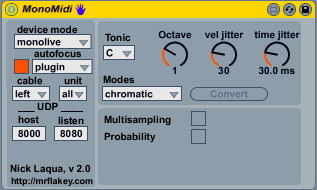
MonoMIDI is a step sequencer to be controlled via the monome. It’s based on manipulating Live MIDI clips, rather than using live.step or other means. So in my opinion, it fits the workflow better where one might use a keyboard next to a monome or an MPC.
Part of the code base was taken from the Ableton Clip Step sequencer, thx for that. Unfortunately, the monome isn’t recognized as a control surface by Live which was one of the reasons for developing it.
The features in a nutshell:
- support for MIDI clips with up to 64 steps (1 step = 1/16 note, which makes it 4 bars) and 49 drum pads (or 7 octaves when using scales)
- Full scale support including chromatic mapping and other custom scales
- Scale conversion
- advanced duplication facilities for partial note sequences
- multisample mode (device chooses out of 8 samples based on weighted probability)
- MIDI clip navigation mode
- extensive humanization options (velocity and timing randomisations)
- Adjustable note length
- Playhead visualisation
- works standalone and integrated into MonoLive
The detailed documentation can be found below, as well as the device.
enjoy, nick
Download